Custom Analytics Integration
Overview
The following steps will show you how to integrate custom analytics, such as a homegrown system, package with seoClarity so your domain’s analytics data can be loaded into the platform. This can also be used for historical analytics for integrations that do not provide it otherwise, such as Adobe Data Connectors, and sub-properties for use in Clarity360.
Background & Requirements
The most important requirement for integrating a custom analytics setup with your seoClarity account is to ensure someone with the proper access is able to generate daily automated organic search reports. The file name should contain the domain and date for which the report belongs to. Reports should be specific to just one domain.
Required Dimensions & Metrics
- Search Engine - If organic search engine data cannot be included, then all search engine level analytics data will be shown as Google (specific to the country that domain is rank checked in), unless otherwise specified.
- Device Type - Device type should be provided and will be split between either Desktop or Mobile. Where the device type is not clearly defined, a supplementary mapping should be provided to determine the type as desktop or mobile.
- Page - Page level organic analytics data is mandatory and cannot be excluded
- Traffic - The naming convention for this might be seen as entrances, sessions, visits or something similar. This should be the organic metric used for reporting internally. For uniformity, this is seen as Traffic throughout the platform.
Optional Metrics
- Bounces
- Transactions - E-commerce conversion data
- Revenue - E-commerce conversion value data
- Goals - Any relevant analytics goal data can be included. This is typically maxed out at 20 total goals and includes their corresponding conversion value and rate.
NOTE: For goals or metrics that are calculated in your analytics platform, such as Bounce Rate or Average Time on Page, these should instead be created as Custom Metrics within the platform leveraging both separate data points. For example, Bounces can be integrated as a metric that allows for Bounce Rate to be created as a Custom Metric by dividing Bounces / Traffic. Similarly Total Time on Page can be integrated as a metric that would allow for Average Time on Page to be created as a Custom Metric by dividing Total Time on Page / Traffic. This ensures those metrics are correct over any period of time, whereas if we pull them in directly as they are in your analytics platform they have already been calculated for that day and when looking at a date range greater than that one day, as the goals will sum themselves over the entire date range.
Example
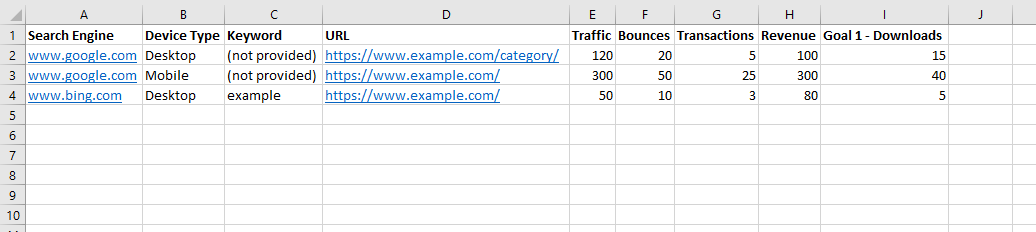
The screenshot below is a 3 line sample file of an ideal custom analytics file. It includes both the required metrics and some of the optional metrics.
Delivery Method
Custom analytics can be delivered in a variety of ways, with e-mail and FTP being the most commonly utilized options. The FTP/SFTP method is preferred and those credentials can be attained via the Integration Settings.