PPC vs Organic Overview
PPC vs Organic is an enabled feature that leverages a PPC integration and GSC integration. This feature helps to compare organic and paid keyword search performance .
Background & Requirements
To use the PPC vs. Organic feature, you will need to have an online advertising management platform integrated along with Google Search Console. To start integrating a paid media platform visit our Paid Data Integrations section.
1. Find new keyword opportunities and better understand keyword search intent.
Learn More2. Improve landing page content relevancy.
Learn More3. Reduce cost by Identifying high cost and low performing paid keywords.
Learn More4. Increase revenue by improving targeting of high converting keywords.
Learn More
PPC vs Organic
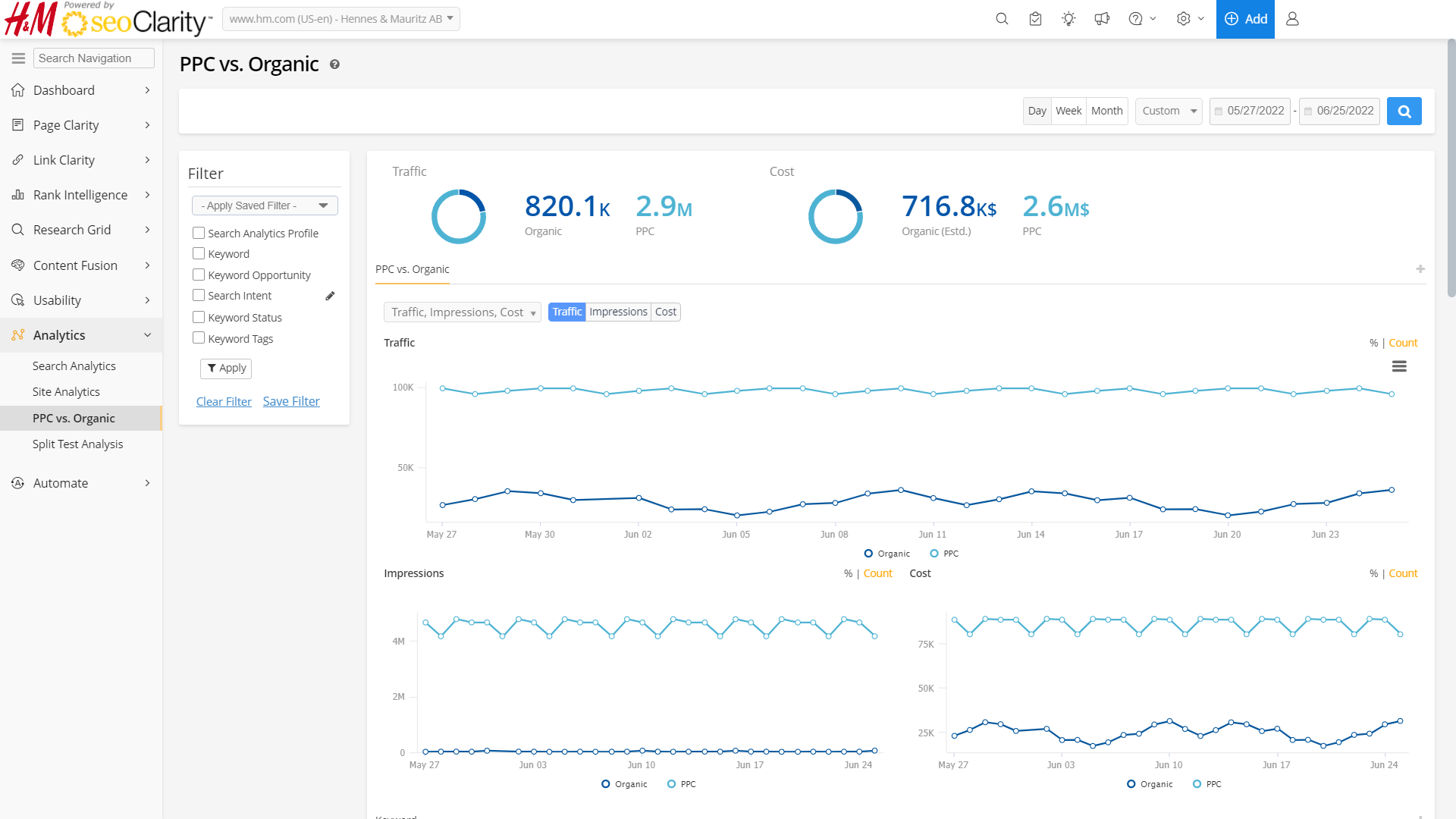 PPC vs Organic Chart
PPC vs Organic summary boxes charts
Clicks: Displays the number of clicks driven by organic search (as reported by Search Console) compared to clicks driven by paid search via the integrated PPC data.
Cost: Displays the cost of clicks driven by organic search (as reported by Search Console) compared to the cost of clicks driven by paid search via the integrated PPC data. Organic cost is determined based on the number of clicks multiplied by the average
cost per-click.
PPC vs Organic trend charts
Clicks: Displays a trended comparison of clicks for organic and paid search.
Impressions: Displays a trended comparison of impressions for organic and paid search.
Cost: Displays a trended comparison of cost for organic and paid search.
Rank: Displays a trended comparison of average rank for organic and paid search.
CTR: Displays a trended comparison of average click through rate for organic and paid search.
The following can be enabled via Settings
Transactions: Displays the number of transactions driven by PPC Clicks.
Item Revenue: Displays the number of revenue driven by PPC Clicks.
Conversion Rate: Displays the average conversion rate for paid results.
Goal Completions: Indicates state of goal completion.
Goal Value: Customizable. Displays the number of Goal value driven by PPC Clicks.
PPC vs Organic filters
Search Analytics Profile: Select a specific search analytics profile to compare data with.
Merge Profiles: Filter option that allows multiple GSC profiles, if available, to merge and compare GSC data with PPC data.
Keyword: Filter for keywords based on criteria including: Is, Isn't, Contains, Does Not Contain, Starts With, Ends With, RegExp, or RegExp Not Match.
Keyword Opportunity: Select 'In Organic, Not Paid' to filter for keywords with organic search data but no paid data. Select 'In Paid, Not Organic' to filter for keywords with paid search data but no organic data. Select 'In Both' to view keywords with organic and paid search data.
Search Intent: Search Intent helps segment data by the underlying intent. This is most commonly used for Brand and Non-Brand analysis. Simply specify the patterns to match and the data is segmented on the fly immediately.
Tracked Status: Select Tracked Keywords to view just keywords tracked in the platform or Untracked to view just keywords not tracked in the platform.
Keyword Tags: Select a keyword tag to view results for just keywords within that tag that also has GSC data available.
PPC Rank: Select this filter to find rankings that are "equals, greater than, less than, and between"
Organic Rank: Select this filter to find rankings that are "equals, greater than, less than, and between"
Save filter: In addition to the standard filtering options available throughout seoClarity, it is possible to save a customized filter with specific inputs to refine the viewable data.
To create one, just select from the filters the required variables, and assign a name to it. Next, just save it and it will be ready to be used whenever needed.
PPC vs Organic table columns
Quality Score: Displays the
quality score for the keyword where available from the integrated PPC data.
Clicks: Displays a comparison of clicks for organic and paid search for the date range selected.
Rank: Displays a comparison of average rank for organic and paid search for the date range selected.
Cost: Displays a comparison of cost for organic and paid search for the date range selected.
- Organic Estd: This is the total cost based on organic Clicks multiplied by the Avg. CPC
- PPC: This is the total cost based on PPC Clicks multiplied by the Avg. CPC
Avg CPC: Displays the average cost per click for a keyword during the date range selected. It is calculated by dividing a keyword's PPC cost and PPC Clicks (Cost / Clicks) that is available from the PPC reports. Note: Organic only keywords that appear in the table are derived from Google Search Console. These keywords will use the Avg CPC for all keywords in the selected date rage (total cost/total clicks).
Impressions: Displays a comparison of impressions for organic and paid search for the date range selected.
CTR: Displays a comparison of click through-rate for organic and paid search for the date range selected.
The following can be enabled via Settings
Transactions: Displays the number of transactions driven by PPC Clicks.
Item Revenue: Displays the number of revenue driven by PPC Clicks.
Conversion Rate: Displays the average conversion rate for paid results.
Goal Completions: Indicates state of goal completion.
Goal Value: Customizable. Displays the number of Goal value driven by PPC Clicks.