HTTP to HTTPS Transition
Objective
When you are looking to move a large amount of content from one set of URLs to another, you are looking to perform a site migration. A site migration is moving the current domain to another or taking content from one page to another as you would with an HTTP to HTTPS site migration.
This document will help you understand each step of the process of changing your site from a non-secure, HTTP, to a secure, HTTPS, website in seoClarity. There are other examples of migrations or transitions, but this is one of the most common migrations, especially since Google announced HTTPS as a priority and a ranking signal.
Requirement
To complete this walkthrough with the most ease, you should have the Page Clarity feature open in a browser window along with transition checklist. Please keep in mind that this is an example of a site migration. HTTP to HTTPS is not the only type of migration.
Note: Once the profiles are switched over, GSC data for the http site will be minimal.
Workflow Steps
Choose a date BEFORE the site migration and one AFTER the site migration
The ranking AVERAGE will show the overall Avg Rank Change
Filter the URL column for HTTPS
Since the date comparison is for before and after, the Avg Rank change indicates the change in ranking due to https for those keywords
Rank positions chart shows how the rankings have SHIFTED in position
Site Transition Checklist
Download the Site Transition Checklist Template (attached to this document)
- This document can be used for all transitions, migrations, and site changes.
Complete all the available tabs
The available tabs are: Transition Checklist, Page Clarity Redirects, Rank Clarity Data, and Site Clarity Data. Filling this out will give you the opportunity to view your benchmark metrics and compare your new URLs' data to. The substeps below will explain more in depth.
Transition Checklist
The Transition Checklist will take you through the necessary data you will need to get a good sense of how your transition is going. This tab in the spreadsheet will ask you for different metrics that will provide a good understanding of how everything is going. Whether pages have redirected properly, if traffic has been lost, or if rankings have dropped.
Page Clarity Redirects
Knowing where you start and knowing where you are going is always a good thing to know. This allows you to learn from the past and prepare for the future. This is exactly what the Page Clarity Redirects tab is for. Go to Page Clarity to download all of the pages. Then take the time to map out the URLs that the old URLs will redirect to.

Rank Clarity
During this process, your keyword data will be redirected to the new pages making it important to track them during the migration as well. You will want to know if rankings have fluctuated or if the search volume has changed since the migration. To do this, select the Download All option in Rank Clarity. Once you have the download, copy and paste the data into the Site Transition Checklist spreadsheet.

Clarity Audits
Running a site crawl is one of the best things to do before and after your site migration. The crawl will provide you with all of the data you need to understand the health of your site. To do this, run a crawl in Clarity Audits (how to video). After the the crawl has completed, you can download the data and paste it into the spreadsheet.

Analytics Page Report
With every site transition, an expected decline in analytics performance occurs. This should rebound once the search engines have crawled and indexed the new pages.

Parent-Child Relationship Setup
Setting up a Parent-Child Relationship is important to maintain data between historical URLs and new URLs. This example is focused on transition from http: to https:.
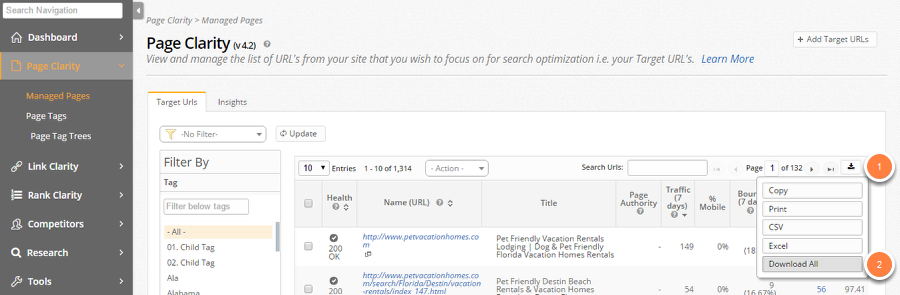
Page Clarity: Export URLs
1. Click the Export button on the top right of the table
2. Click Download All
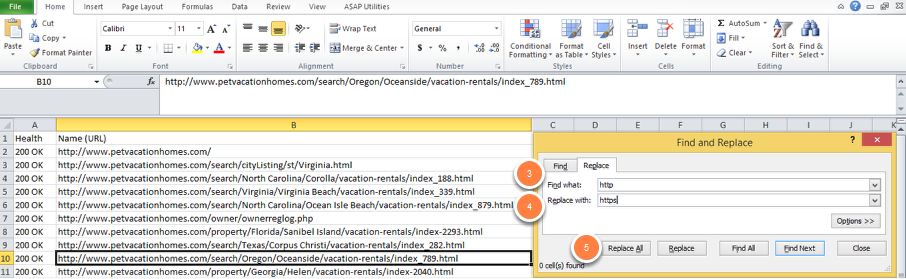
Page Clarity: In Spreadsheet
3. Select Ctrl + H on your keyboard
4. Enter in http in the Find what: text box
5. Enter in https in the Replace with: text box
6. Click Replace All
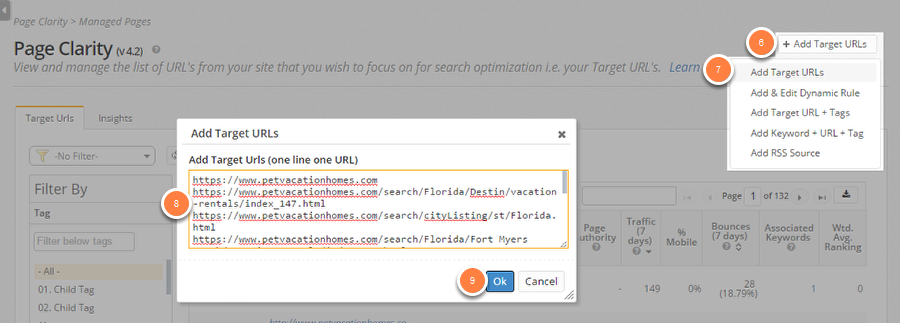
Page Clarity: Add New URLs
6. Click Add Target URLs
7. Click Add Target URLs from the dropdown
8. Add the updated https URLs
9. Click Ok
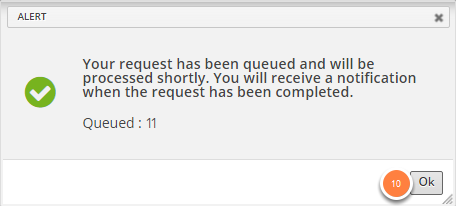
10. Click Ok
Page Clarity Detail: Technical tab Navigation
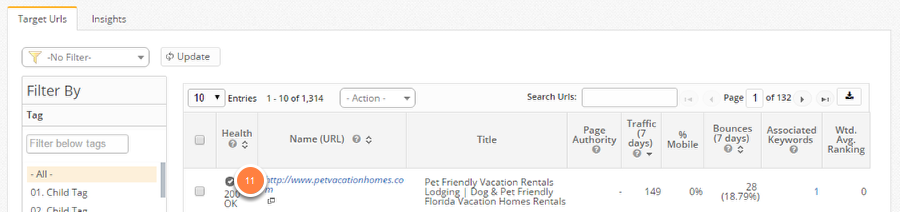
11. Click on a Name (URL) to go to the Page Clarity Detail
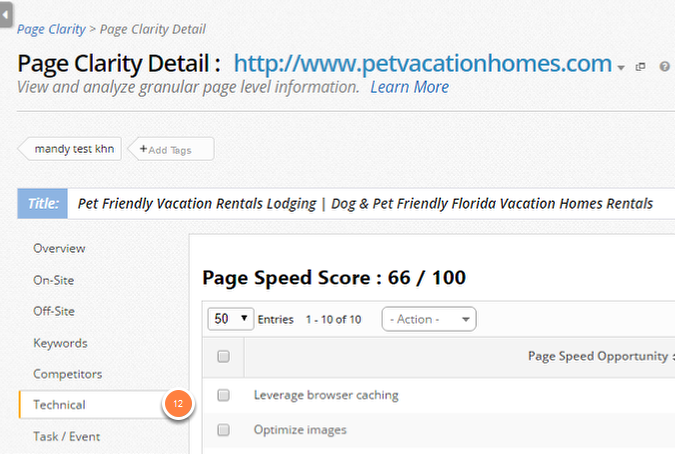
12. Click the Technical tab
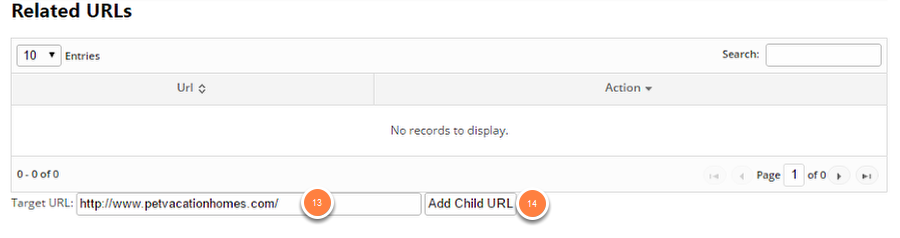
Page Clarity Detail: Creating Child URLs
13. Enter in the http:// version of the URL in the Target URL text box
14. Click Add Child URL
Steps 11-14 will need to be repeated until each Child URL is entered. For bulk Parent-Child updates, contact support@seoclarity.net

Analytics
After setting up the Parent-Child Relationship, we want to ensure the analytics feed will receive the new page data. Assuming the tracking code has been placed on the new pages. There is minimal change.
Google Analytics
For Google Analytics integrations, email support@seoclarity.net in order to have the team update the domain appendage from HTTP to HTTPS.
RSS Feed
If you have any RSS Feeds setup using the old URLs and not the new URLs, you can add new from the Universal Add option and remove the old from the Settings page. Learn More
Summary
Switching your site from HTTP to HTTPS is a smart, secure move that has the potential of increasing your rankings. If this is your plan for your website, adding this to the plan will help track, monitor, and manage these new pages.