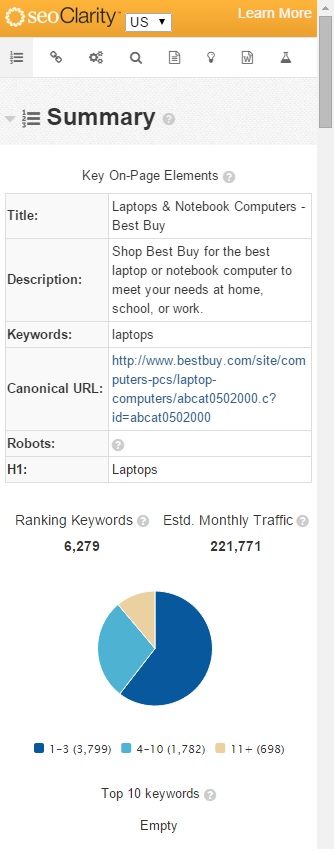
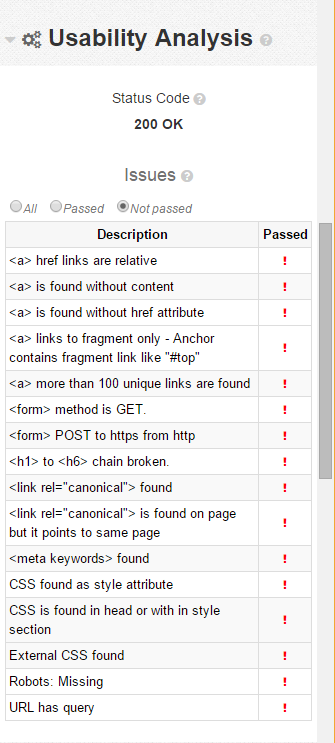
Below is a list of all the rules (65 in total) found in the Chrome Page Optimization Plug-in's usability analysis with brief descriptions.
<a> has both href and onclick attribute: Using two linking functions when only one is needed
<a> href is either empty or contains white spaces: A link that is missing a href attribute
<a> href links are relative: Relative links have been found on the page and these are links that do not contain a complete URL <a href="test.html">Click Here</a>
<a> is found without content: Href does not include a message-body
<a> is found without href attribute: The anchor tag does not have a link
<a> links to fragment by name attribute - Link to fragment by name attribute: Fragment link discovered in the anchor
<a> links to fragment only, anchor contains fragment link like "#top": Fragment link, like "#top" found in the anchor. When using a <base> tag, the fragment links refer to the base URL.
<a> more than 100 unique links are found: This page contains more than 100 unique links. A reasonable number of links on one a page is less than 100 and best practice is to reduce the number of links.
<a> no internal links found: This page contains no links on page to navigate to other parts of the website
<base> found: This page contains relative links that are relative to the <base> and is not recommended
<base> is found on page and is same as page (that is page url): This page contains relative tags that link to same page
<base> is found on page and it points to different page: This page contains relative tags link to another page
<form> method is GET: This page requests URLs that may be called outside context, accessible to bots and search engines. Switch to POST if this is not the desired outcome.
<form> POST to https from http: The <form> is located on a http page and may need to switched to https
<form> Unsafe GET to http from https: The <form> is submitted to a http page but is located on a https page.
<form> Unsafe POST to http from https: The <form> posts to a http page while it lives on a https page.
<h1> to <h6> chain broken: This page contains a chain that is not in a strictly hierarchically order
<link rel="canonical" found outside <head>: The canonical element is not inside of the <head> section and search engines will ignore it
<link rel="canonical"> element found twice and it differs: Multiple canonical elements have been found and a <link> tag with rel="canonical" or an according Link header that specify different targets
<link rel="canonical"> found: A canonical element that has a a <link> tag with rel="canonical" or an according Link header
<link rel="canonical"> found more than once: Multiple canonical elements have been found and a <link> tag with rel="canonical" or an according Link header
<link rel="canonical"> is found on page and it points to different page: A canonical element has been found and points to a different page
<link rel="canonical"> is found on page but it points to same page: A canonical element has been found and points to the same page
The canonical element can be removed from the page.
<link rel="canonical"> link contains malformed or empty url: A canonical element has been found in a <link> with an incorrect or no URL
<link rel="canonical"> not found: A canonical element, a <link> tag with rel="canonical," nor an according link header has not been found
<link rel="canonical"> URL is not absolute: A canonical element that specifies an URL relative to the page has been found
<meta description> missing or empty: There is no meta-description found on the page.
<meta description> occurs twice: Two meta-descriptions are found the page when no more than one is necessary.
<meta description> too long for Google snippet: There are too many characters in the meta-description and can be considered unfriendly to search engine crawlers.
<meta keywords> found: This page contains meta-keywords.
<meta refresh> found: This page contains a meta-refresh, an instruction for the web browser to automatically refresh.
<meta> found outside <head>: This page contains a meta tag that is not in the head tag and may not have any effects on rankings.
<title> found outside <head>: This page contains a title tag that is not in the head tag and may not have any effects on rankings.
<title> missing or empty: This page does not contain or has an empty title tag.
<title> occurs twice: This page contains two title tags when no more than one is necessary.
<Base> contains malformed or empty url: This page contains a base tag that has an invalid URL in its href attribute. In order for this to be corrected, the URL will have to be absolute or in other words, it has to start with http:// or https://.
CSS found as style attribute: This page contains CSS style attributes and should be placed in a separate file.
CSS is found in head or within style section: This page contains CSS in the head tag or style section and should be placed into a separate file.
Duplicate id found: This page contains the same ID more than once and can cause issues with fragment links, javascript, and forms.
External CSS found: This page contains multiple CSS files and should be merged into one file
H1 and H2 not found: This page contains no H1 or H2 headers
H1 not found: This page contains no H1 header
Image alt attribute exists but empty: An image on this page does not contain any alt attributes.
Image has no alt attribute: An image on this page does not contain any alt attributes.
Image has no width and height attribute: An image on this page does not contain any width or height attributes and may perform poorly.
Image has no width or height attribute: An image on this page does not contain any width or height attributes and may perform poorly.
Meta robot contains multiple sources in which one contains nofollow other do not: This page contains multiple sources for meta robots and at least one contains nofollow.
Meta robot contains multiple sources in which one contains noindex other do not: This page contains multiple sources for meta robots and at least one contains noindex.
Meta robot content contains no follow: Robot tag instructs crawler not to crawl the link's target
Meta robot content contains no index: Robot tag instructs crawler not to index the page
More than one <base> tags found: This page contains multiple <base> tags. The last link is used for link resolving.
More than one H1 found: There is more than one H1 tag
Robots: Missing: No robot tag found, there are no restrictions on crawling your website
Robots: Specified twice: Two robot tags found, robot will use most restrictive one
Title is less than 10 characters or is a single word: This page contains a title that is less than 10 characters or only a single word
Title too long for Google snippet: The title has too many characters and will not display properly in the snippet
Two different <base> directives found on page: This page contains two <base> directives that are not the same
URL has // in path: The URL contains a typo - 2 consecutive slashes
URL has 3 or more query parameters: This page is highly dynamic page, assumed poor page quality
URL has more than 115 characters: The URL contains a number of characters that is too high or unfriendly
URL has non-ascii elements in path: The URL does contain non-ascii characters
URL has non-lowercase elements in path: The URL contains characters that are capitalized, or non-lowercase
URL has query: The URL contains contains a query string
URL has repetitive parameters in query: The URL contains parameters that have repeating elements
URL too long for some browsers: the number of characters cannot be viewed in some browsers