Custom PPC Integration
Objective
The following steps will show you how to integrate a custom PPC report, such as a system that is not currently documented, with seoClarity so your domain’s PPC data can be loaded into the platform.
Requirements
The most important requirement for integrating a custom PPC setup with your seoClarity account is to ensure someone with the proper access is able to generate daily automated reports. The file name should contain the domain and date for which the report belongs to. Reports should be specific to just one domain. It is also important to note that PPC integration is based on enabled Search Engines.
Required Dimensions & Metrics
- Keyword - This is the keyword search that your PPC ads are targeting.
- Search Term - This is the actual term searched by end users.
- Traffic - The naming convention for this might be seen as entrances, sessions, visits, clicks or something similar. For uniformity, this is seen as Traffic throughout the platform.
- Impressions - This is the number of times an Ad was displayed in the PPC portion of the SERP
- Cost Per Click - This is the CPC for traffic driven for that keyword. This is used to calculate Total Cost.
Optional Metrics
- Avg Position - Where available, this is the average rank position displayed in the PPC portion of the SERP.
- Transactions - This is the E-commerce conversion data, which can also be seen as Purchases, Orders, etc.
- Revenue - This is the E-commerce conversion value data, which can also be seen as Earnings, Value, etc.
- Goals - Any relevant goal data can included. This is typically maxed out at 20 total goals and their corresponding conversion value and rate.
- Quality Score - This is the Google score of the Ad from 1-10.
Example Report
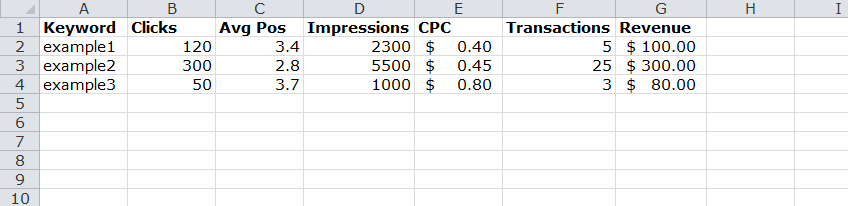
Delivery Method
Custom PPC Reports can be delivered in a variety of ways, with e-mail and FTP being the most commonly utilized options. The FTP/SFTP method is preferred and those credentials can be attained via the Integration tab on the Settings page .