Bot Clarity Overview
Bot Clarity provides an incredibly powerful set of reports and analysis to help understand not only the amount and frequency of bot activity, but also correlate the same with your other metrics at both an aggregate site level and individual URL level. The value of server logs is often underestimated, despite its potential for evaluating audits. The benefits of collecting and using log data to understand bot behavior is exceptional.
Bot Clarity works by taking the raw log files from your servers (filtered to show only bot hits) which we then analyze, process and store in our platform. We process the logs to identify the various bot user-agents, group them by the search engine they belong to, the unique pages/URLs visited by each bot, the status code of each page visited and the date and time stamp of the same. This data is then summarized and presented on the Bot Clarity page in a way that allows for easily viewing the trend of bot activity over time as also the ability to drill down and view detailed crawl activity at a URL level.
Watch this video for a quick visual overview of Bot Clarity
Watch this video to learn how to use Bot Clarity to analyze log files:
Background & Requirements
Bot Clarity require bot logs to be integrated prior to use. Integration documentation can be found here. Data retention is limited to 12 months.
Bot Clarity Use Cases
- Understand the impact of site architecture changes on bot activity
- Validate content changes were crawled (or not) and when
- Identify server response codes given to bots by page
- Discover where crawl budget is over or underutilized
- Find pages crawled most often to understand their importance
- Determine if spoofed bot activity is impacting the site
Bot Clarity
The Overall tab provides high level summaries of search engine bot activity with the ability for deeper insights using specific date ranges and filtering.
Summary Boxes
Bot Requests: Summarizes bot activity based on the count of requests, unique pages requested, and average requests per page for that date range.
Request Status: Summarizes bot activity based on the response code of the URL for that date range.
Bots: Summarizes the count of unique bots and unique IPs with activity for that date range.
Trend Charts
Requests: Displays a trend of bot activity based on the count of requests, and the count of unique pages requested.
Pages: Shows the count of unique pages (existing or new) that were crawled each day.
By Request Status: Displays a trend of bot activity by URL response code grouped by 2xx, 3xx, 4xx, 5xx and unknown.
By Bot: Displays a trend of bot activity based on the bot or bot group.
By Content Type: Segments crawl requests and unique pages crawled by selected Content Types.
Data Tables
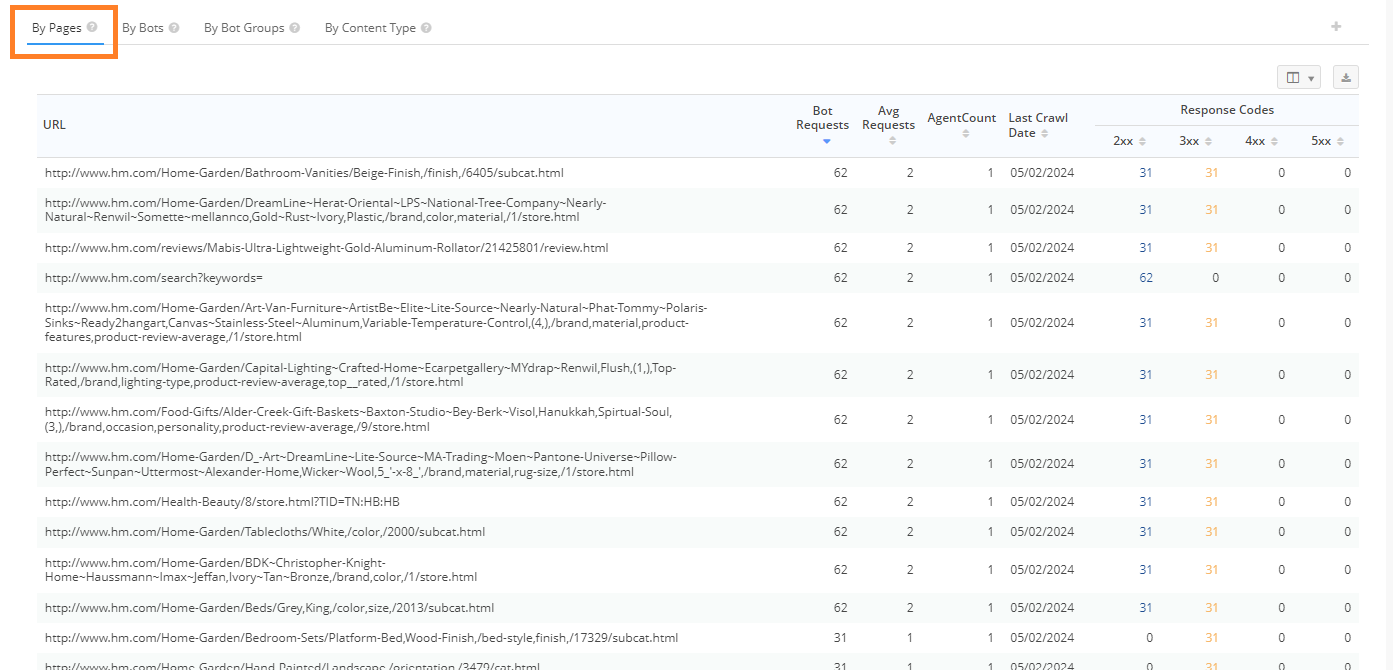
By Pages: This provides the URL level view of bot activity found on a site, by highlighting the unique URLs that were found to have bot activity. This includes the number of bot requests, average number of requests, the number of bots, the last crawl date, and the response codes found based on those bot requests.
By Bots: This provides the User Agent view of bot activity by highlighting the unique bots and their corresponding URL requests.

By Bot Groups: This provides the User Agent group view of bot activity by highlighting the bot groups and their corresponding URL requests.
By Content Type: Segments crawl requests and unique pages crawled by selected Content Types.
Spoofed Activity tab
Spoofed Activity refers to any crawl requests from a bot that declares itself as a major search engine but whose IP doesn't match that of the search engine. If the IP doesn't belong to the search engine, we consider it spoofed. Validated activity is the opposite, it is a bot where the name and IP match the search engine claimed to be. Currently, the platform reviews just search engine user agents and IP combinations. If an IP is found to use a spoofed user agent, it will be considered spoofed for other user agent and IP combinations.
This is based on a DNS method, so it is not dependent on the bot name, meaning even new brand bots are supported. Spoofed activity IPs are reviewed and refreshed on a quarterly (3 month) basis. Information on Googlebots IP list is available
here.
Trend Chart
Validated vs Spoofed Bot Activity: This displays a trend of total bot activity and the number of unique pages requested over time. Counts may be based on a sampling of the data to ensure faster performance.
Data Table
Spoofed User Agent: This provides the Spoofed User Agent view of bot activity by highlighting the unique bots and their corresponding URL requests.
Bot Clarity Filters
Bot Group: The default Bot Groups are populated with the official user agent strings for the popular engines. It can be edited to add the user agent strings that are part of your bot data.
Bot User Agent: Filter specific user agents based on the criteria: is, isn't, contains, does not contain, starts with, ends with, or a Regex pattern.
URL: Filter URLs with bot activity based on the criteria: is, isn't, contains, does not contain, starts with, ends with, or a Regex pattern.
Response Code: Filter the response code returned to bots for requested URLs.
Spoofed Activity: Filter Spoofed Bot Activity to include, exclude or use only Spoofed Bots. Spoofed Activity refers to any crawl requests from a bot that declares itself as a major search engine but whose IP doesn't match that of the search engine.
IP: Filter bot IP activity based on the criteria: is, isn't, contains, does not contain, starts with, ends with, or a Regex pattern
Last Crawled: Filter for pages that were last crawled before, after, on, not before or not after a specific date. Use this to identify pages that have not been crawled in more than X days - and likely at risk of losing rankings.
New Pages: Filter for new pages with bot activity before, after or on a specific date. A new page is one that did not appear for 1 year prior to the date selection.
Page Tags: Filter for all managed pages or a specific page tag group.
Content Type: This allows for nested filtering of pages based on multiple criteria using AND OR statements to be saved and reused.
Group Similar Pages: This filter combines requests for URLs that are Upper Case/Lower Case/Camel Case. It also combines URLs that end with or without trailing slashes.
Sitemap: Filter to exclude or only include URLs found in a specific sitemap. Sitemaps from Search Console can be viewed in Settings.
URL Lists: This filter allows for the creation and application of URL lists. URL do not need to be managed or fit a specific criteria to be added to a list. Selecting the edit icon provides the ability to create, review or delete a list.
Custom Data: Bring in any URL level custom data of your own, via Settings, and use it to filter with those dimensions.
Bots Used in Bot Clarity
Bot activity is based on the search engine bots listed below:
- Googlebot
- bingbot
- Baiduspider
- GPTBot
- PerplexityBot
Clarity Audits: Site crawl information