How to Login into the seoClarity Platform
You will learn how to login to seoClarity to begin using the platform as well as what happens if your account gets locked due to failed login attempts.
Background & Requirements for Logging into seoClarity
How to Login to seoClarity
1. In a web browser, navigate to https://app.seoclarity.net
2. With the welcome email handy, input your email and password or use the single sign-on option through your preferred provider. Accounts limited to single sign on only will not be accessible when not using the single sign on option.
3. Click Go to dashboard
Initial Login
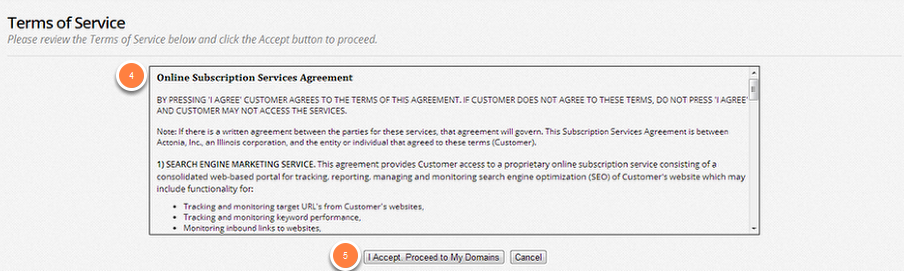
4. Read through the Online Subscription Services Agreement
5. Click the I Accept. Proceed to My Domains button
Selecting Your Domain Profile
Once you log into the platform you will be taken to the Managed Domains selection page. From here you can navigate to any of the unique domains you have access to. If you have access to a single domain, where domain selection is not necessary, you will be automatically navigated to that domain.
How To Reset A Forgotten Password
Entering the incorrect password 3 times in a row will lock your account. If you are locked out, you will receive an email from alerts@seoclarity.net containing an account validation code. To access the account again, you will need to enter the correct login credentials and the validation code you received. After entering the validation code, you'll regain full access to your account.
If you forget your password, click Forgot Password? on the main login page. Enter your email and you'll receive an email with password reset instructions.
