Rank Type: True Rank vs Web Rank

Rank Type: True Rank vs Web Rank

Rank Type Overview

In the platform, you have the option to choose between Google True Rank and Google Web Rank when viewing ranking data. Web rank is the more traditional way to think of rankings, and True Rank is inclusive of organic SERP features.


Rank Type in Rank Intelligence


Google True Rank is the keyword's ranking on the search engine results page (SERP) that includes the organic rankings of images, maps, answer boxes and other organic rank types for that keyword's true rank.


A full list of SERP features included in True Rank are below:
  1. AI Overview
  2. Answer Box
  3. Events
  4. Flights
  5. Images
  6. Job Pack
  7. Knowledge Graph
  8. Local Listing
  9. News
  10. Products
  11. Salary Estimate
  12. Video
  13. Comparison Sites
  14. Recipe
  15. Quick answers
  16. Knowledge Panel
  17. Products
  18. Short Videos
  19. Google Play
  20. Near You
  21. Find Results On 
  22. Discussions and Forums
  23. Popular Destinations

Google Web Rank is the keyword's ranking on the SERP that looks at just organic rankings and excludes the positions of images, maps, and other positions that are not the traditional organic web link ranking for that keyword.  
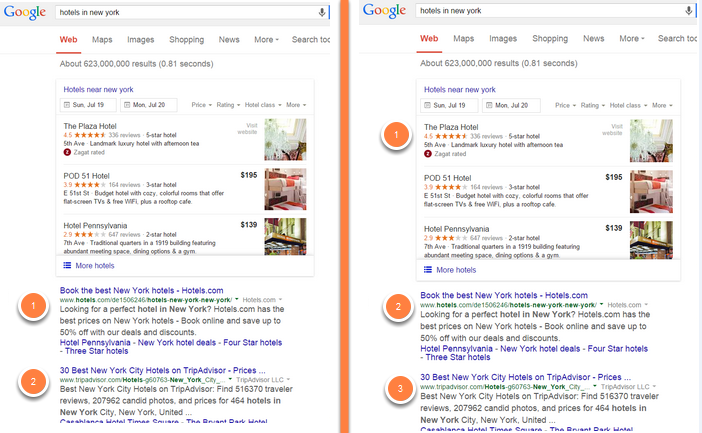

                Web Rank                                                                             True Rank 

Note: Answer Box is a SERP features that are counted in both True Rank and Web Rank.

Because of the incredible impact and cannibalization of standard web rankings and traffic by Answer Boxes they are counted as Web Rankings.  This classification aligns with Google's treatment of Answer Box as an integral component of organic search results, ensuring our reporting remains comprehensive and aligned with Google's search result structure. https://blog.google/products/search/new-way-find-clothes-shoes-and-more-search/


Rankings settings

Widgets in the seoClarity platform default to displaying Google True Rank. If that rank setting is not the desired rank display option in dashboard widgets, setting your Dashboard widgets to Google Web Rank can be done on the Settings page via the Rankings tab Learn More. On the Settings navigation menu, select the Rankings tab and select the third option 'How should the rank positions be calculated?' to view how rankings are calculated in widgets.  Downloading All from the tables will be based on True Rank by default, but Web Rank results will be downloaded if selected.


    • Related Articles

    • Rank Intelligence Keyword Rankings

      Rank Intelligence Overview This article focuses on the Keyword Rankings section of Rank Intelligence. Rank Intelligence allows for on-the-fly analysis of your managed keyword set for multiple ranking metrics compared to multiple domains. Historical ...
    • Visibility Share (V3)

      Visibility Share Overview Visibility Share provides you with a true SERP visibility comparison analysis for any domain up to the top 100 results based on your managed keyword set. It goes beyond traditional keyword rank tracking to reveal how far ...
    • What is the difference between True Rank and Web Rank?

      In Rank Intelligence, you have the option to choose True RankĀ or Web Rank when viewing ranking data. Here are the differences between the two: Google True Rank is the keyword's ranking on the search engine results page (SERP) that includes the ...
    • PPC vs Organic (enabled feature)

      PPC vs Organic Overview PPC vs Organic is an enabled feature that leverages a PPC integration and GSC integration. This feature helps to compare organic and paid keyword search performance . Background & Requirements To use the PPC vs. Organic ...
    • Settings: Rankings Broad vs Exact Match Type

      Rank Match Type Overview In the platform, you have the option to choose between broad match or exact match when viewing ranking data. Broad match will check for any URLs belonging to the provisioned domain and exact match will check for specific ...