Multi-Domain settings

Multi-Domain settings

Overview

The Multi-Domain Setting is an enabled feature that can be added to any seoClarity account. Anyone with Admin level access is able to Add and Modify Multi-Domain settings. Multi-domain allows multiple domains and all the data that goes along with it to be viewed in one dashboard. This saves a large amount of time when tracking and monitoring all of your account's data. This is a great opportunity to create an easy-to-use comparison between the domains you track.

 
Requirements    
A user's email can only belong to one Multi-Domain group. A domain can only belong to one Multi-Domain Group. To add domains to a group, all users must have access to that domain. To add users to a group, they must have access to all domains in the group. 


Creating A Group

After having this feature enabled, groups can be created in order for users to see multiple domains in one dashboard. These groups can be set to include a variety of users and a variety of domains. NOTE: For domains to be added to a group, every user needs access to that domain and vice versa.


After groups are created, they will be able to see the Multi-Domain Roll-Up Enterprise View for the domains that have been set for them when they visit their Dashboard.


Adding a Group

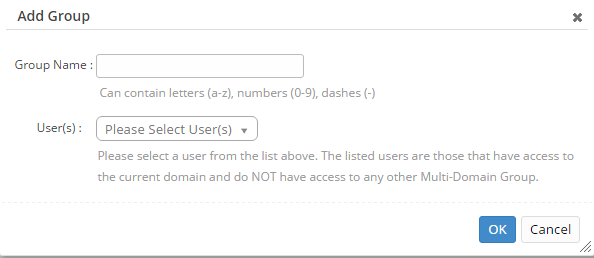
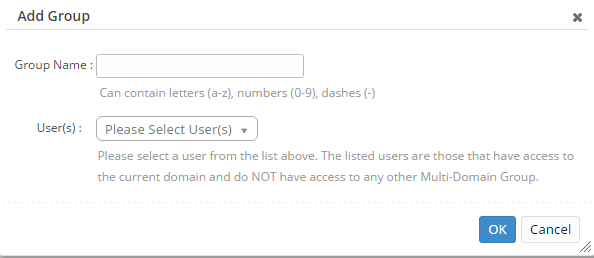
Clicking the Add Group button will bring up a pop up allowing for a custom group name to be entered as well as users to be added. Users that are not currently in the group can be added from the user drop down. Use the check boxes to select the users you want to add to the group and then click Ok. 


The Group name is not the Friendly name for the domain but rather is the collection of domains with multi-domain widgets enabled and their assigned user(s). Friendly name can still be setup via the individual profiles setting separately.


Adding Domains & Users        

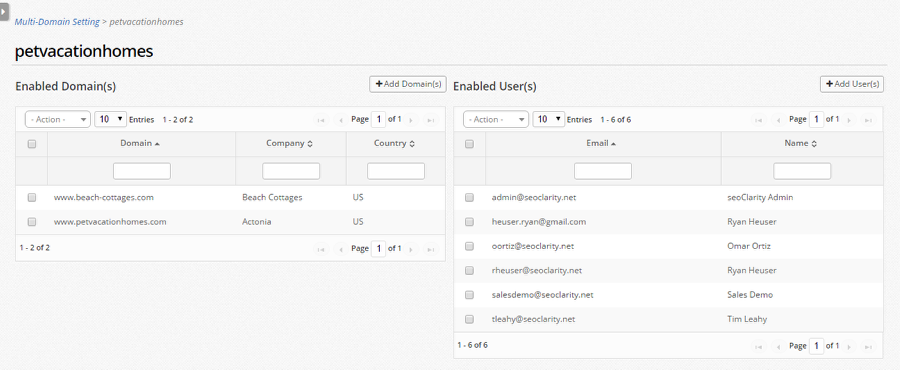
Once a Group has been created, clicking into it brings up two tables: 

  1. To add/remove domains 
  2. To add/remove users


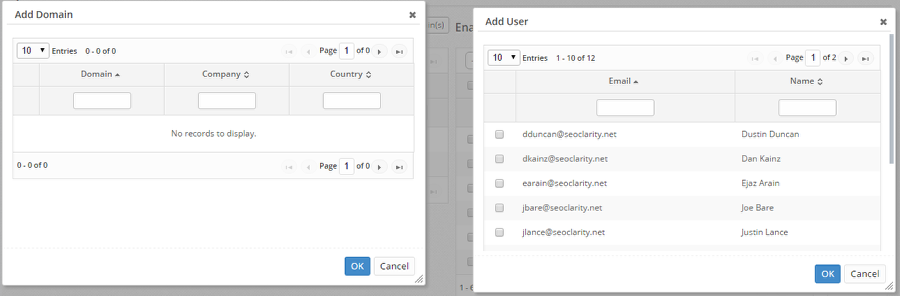
The Add Domain pop up is limited to the domains that all user(s) collectively have access to. The Add User pop up is limited to users that have access to all of the domains in that group.


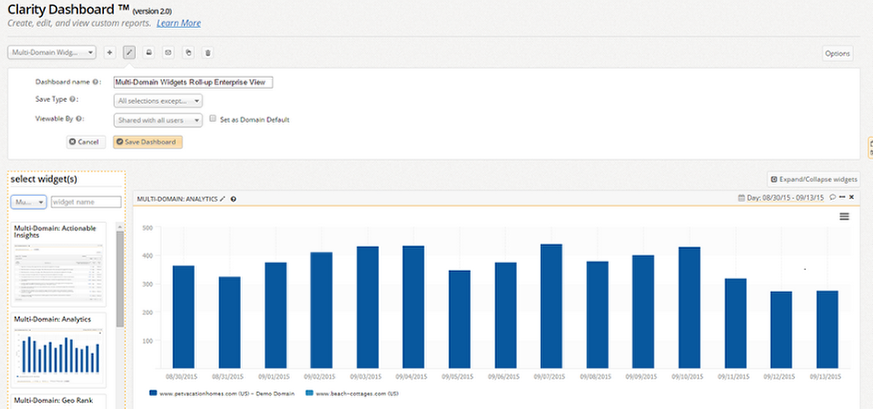
Roll-Up Enterprise View Dashboard

Once Multi-Domains have been setup, the Multi-Domain dashboard widgets will be available via the dashboards with a widget type filter option seen in the dashboard edit screen. This includes 9 widgets in total and can be created by any user with access.


To learn how to create the Multi-Domain Roll Up Enterprise View dashboard, visit the Roll-Up Enterprise View Dashboard.


    • Related Articles

    • Multi-Domain Dashboard

      Multi-Domain Dashboard Overview seoClarity's Multi-Domain dashboard option provides reporting for multiple domains in one single dashboard. The Multi-Domain dashboard aggregates the data for multiple domains whether they are desktop domains, mobile ...
    • Settings: Friendly Domain Name

      Friendly Domain Name Setting Overview The Friendly Name setting allows for a custom naming convention to be included in the display of a managed domain. This also provides groupings for Multi-Domain Dashboards. Background & Requirements To setup a ...
    • Customization Settings

      Customization Settings Settings are administrative-only options for customizations and integrations within the account. Below are descriptions of those found on the main settings tab. Associate Competitor URLs Can activate an automatic association of ...
    • Dashboard Widgets & Descriptions

      Dashboard Widgets Overview Below is a list of the Dashboard widgets including: the type of data they use, what they visually appear as, if they include a data table, a description, and the platform section the data can be seen in. Some widgets are ...
    • Users settings

      User Settings Overview Setting up and managing user accounts is one of the first steps to take in the seoClarity platform. It is a basic task, yet one of the most important tasks to take care of when setting up and managing an account. Managing Users ...