Google Search Console Data Differences
GSC Data Differences Overview
Google Search Console provides a wealth of data about how your website is performing in search results. However, when comparing data from the Google Search Console interface to Search Analytics in our platform differences can arise due to how the data is accessed, filtering, GSC profiles selected, and comparing summary boxes.
Google Search Console Data Differences Explanation Video:
Summary Boxes vs. Detailed Views
- Summary Boxes: These provide a holistic view of all data and are equivalent to the Summary data option in our platform. However, they don't break down data by specific URLs.
- Summary View: Equal to the Summary Box data seen in Google Search Console. The Summary view is not available when filters are applied.
- Details View: When filters are applied, the data becomes more specific and detailed. Detail view reflects the raw data from the API and can differ from the summary boxes.
Examples
- The Summary Box data seen in Google Search Console is a holistic view of all data, which is equal to the Summary data option seen in the summary boxes in our platform.
- Comparing summary box vs Summary view in Search Analytics for the same time period from the screenshot above:
- The Summary view option is not available once filters are applied. When a filter is applied in Google Search Console it uses the same raw data they provide us and we display in the Detail view.
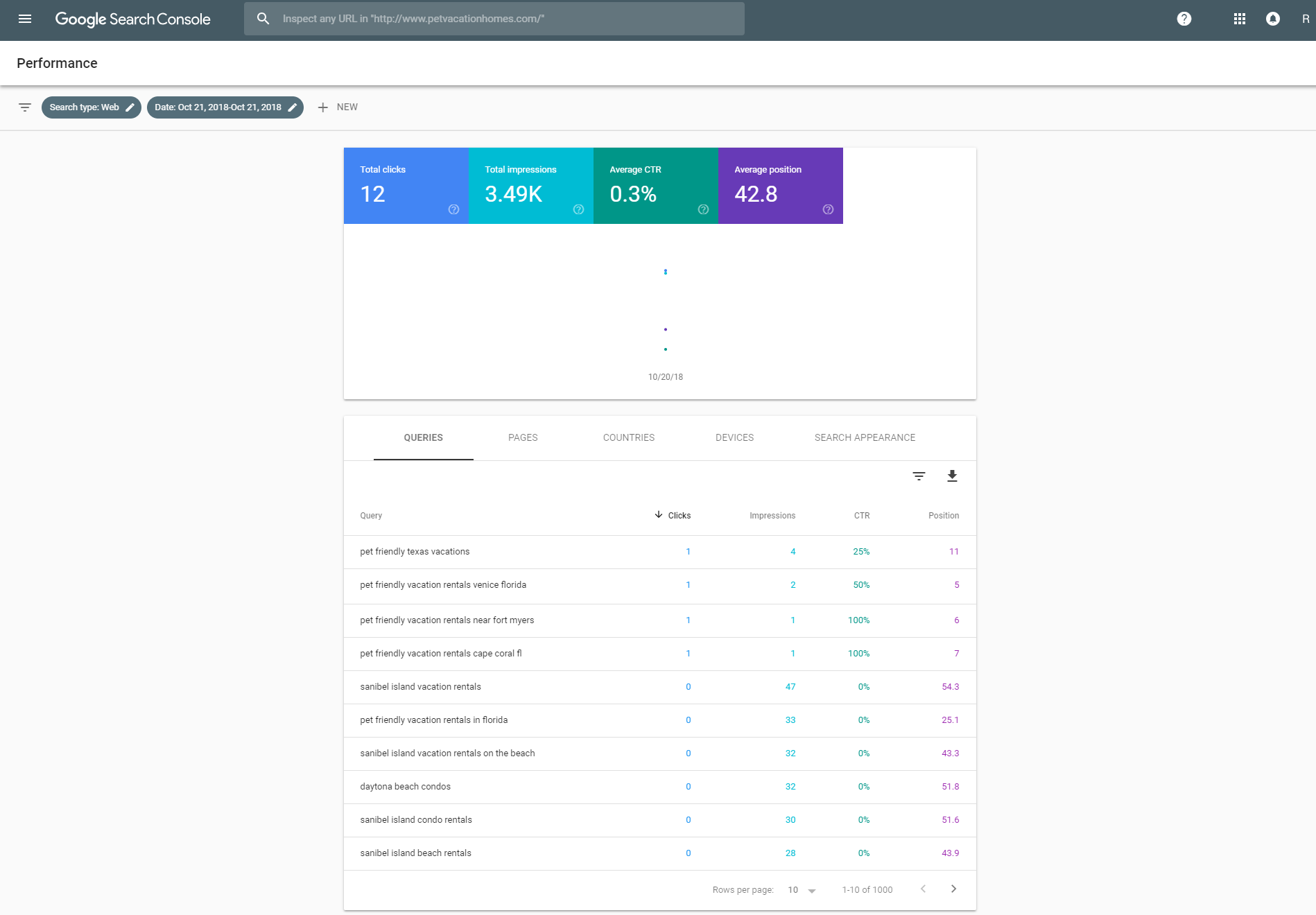
- The data seen in the platform for the Details summary boxes is a summary of the data available through the API and is reflective of the data in the data table. The graph only shows data aggregated by property, never by URL (this is a feature according to Google Learn More).
- An example of this can be seen in the image below, where Google Search Console summary boxes show 12 total clicks versus the data table which shows 4 clicks. The Google Search Console summary boxes are not a summary of the data table. Learn More
Search Console Filtering
Comparing the data table in the Google Search Console interface between dimensions such as keyword vs page will also yield different numbers unless all dimensions are included (keyword, URL or both) as well as the date, country, and device.
- It's important to filter for each dimension when comparing this view in the Google Search Console interface.
- Because of this level of detail, Google may drop some data in order to be able to calculate results in a reasonable time using a reasonable amount of computing resources. Learn More
- By Date: The latest data in GSC can be up to 3 days old, to account for this the platform is delayed a day beyond that. Fresh data points are made available via the API indicated by the orange data points in our Search Analytics feature - as recent as a day old. Learn More
- By Property or Page: Metrics like impressions, clicks, position, and click-through-rate are are calculated differently when grouping results by page rather than by property. Learn More
- By Country: By default, data is shown for all countries, but you can filter by specific countries.
- By Devices: The data retrieved in the platform is based on Desktop, Mobile, Tablet or All Devices. All Devices is a summary of both Desktop, Mobile, and Tablet.
- By Search Type: The data retrieved in the platform is based on the Web Search Type and does not include Image or Video.
Search Console Profiles
- When comparing data, it's important to make sure the correct profile is being viewed in both platforms. To retrieve a specific profile's data, it must be added from the integrated profile seen in the Settings page. Learn More
API Search Console Data
- The Search Console API allows for up 25,000 rows of data (see 'rowLimit') to be retrieved per query. This API is queried multiple times to allow for an even greater number of rows of data to be retrieved up to 50,000. This differs from the number of rows available via the Search Console interface, which has a default of 1,000. This means seoClarity will have more rows of data available, upon which the seoClarity Details data is summarized. Learn More
- Search Console's average position metric can differ from rankings in Rank Intelligence as managed keyword rankings are retrieved once per day, whereas Search Console averages the position for impressions throughout the entire day. Learn More

Need more help? Email our friendly support team at support@seoclarity.net and we'll get back to you as soon as possible.