SEO Forecasting (Traffic Potential)

SEO Forecasting (Traffic Potential)

SEO Forecasting Overview

SEO Forecasting (formerly Traffic Potential) is a forecasting feature that allows you to project future performance based on variable driven scenarios using keyword ranking data. Similarly, it can be used to compare historical performance to highlight potential return on investment. 


Background & Requirements for SEO Forecasting

Navigate to SEO Forecasting via the menu on the Analytics tab. Keywords must be tracked in the platform to use the Managed Keywords data source and Search Console must be integrated to use the Search Analytics data source in the SEO Forecasting feature.


SEO Forecasting Use Cases

  1. Forecast SEO traffic performance leveraging ranking models to prioritize your SEO campaigns. Learn more
  2. Compare historical performance of ranking data in an ROI scenario. 

SEO Forecasting


SEO Forecasting Video


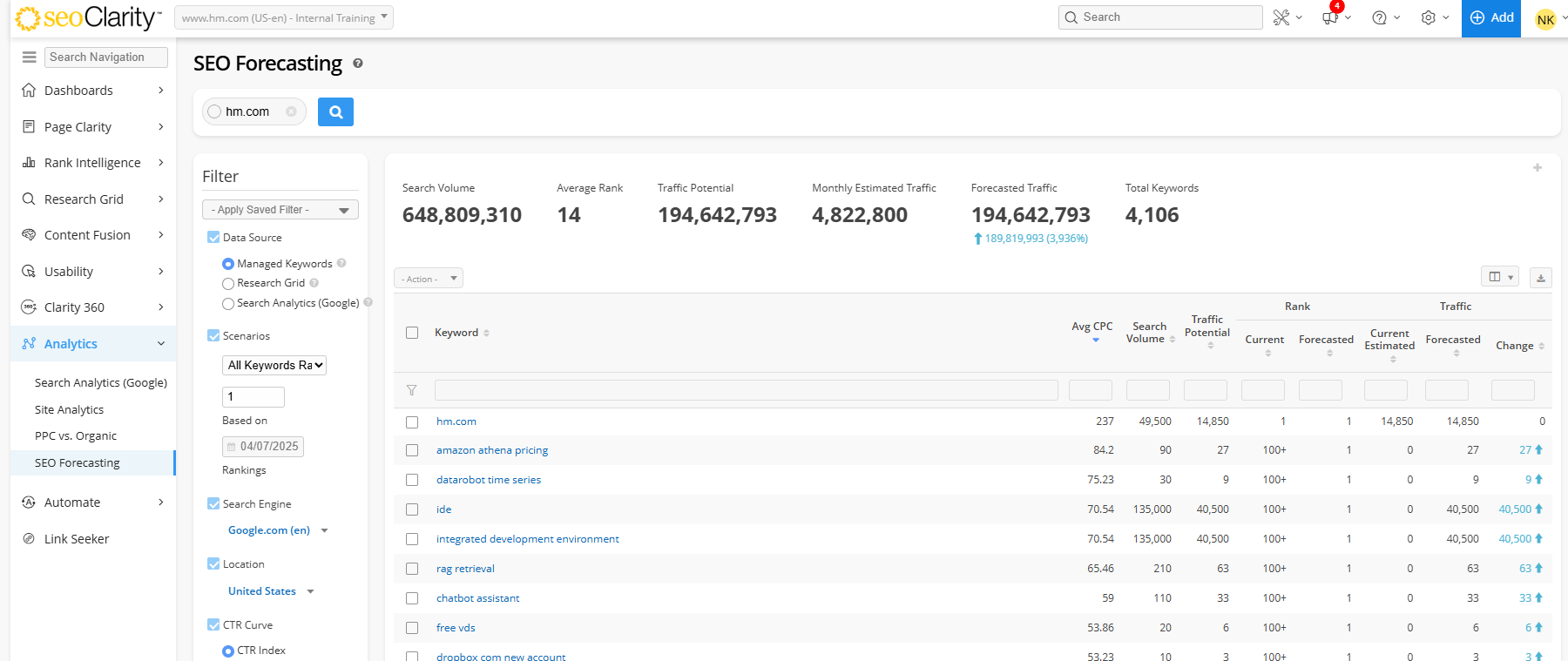
SEO Forecasting summary
Search Volume: Displays the total amount of search volume of all the keywords included in the data table.
Average Rank: Displays the average ranks of all the keywords included in the data table.
Traffic Potential: Displays the total amount of search volume for all position 1 keyword rankings in the data table.
Monthly Estimated Traffic: Displays the monthly amount of estimated traffic for all the keywords included in the data table.
Forecasted Traffic: Displays the total amount of traffic that is predicted by the variation model for all the keywords in the data table.
Total Keywords: Count of keywords 
Traffic Acquisition Value: Available in the ROI scenario, displays the cost of estimated traffic based on the CPC value for that keyword.
Goal - Current Estimated: Displays the total amount of estimated traffic based on the variation model for all the keywords in the data table. This is based on the input from Conversion Estimates.
Goal - Forecasted: Displays the total amount of traffic that is predicted by the variation model for all the keywords in the data table. This is based on the input from Conversion Estimates.
Goal Value - Current Estimated : Displays the total amount of value that is predicted by the variation model for all the keywords in the data table. This is based on the input from Conversion Estimates.
Goal Value - Forecasted: Displays the total amount of value that is predicted by the variation model for all the keywords in the data table. This is based on the input from Conversion Estimates.

SEO Forecasting table
Keyword: Displays the keywords found ranking for the input domain based on the data source selected.
Avg CPC: Displays the average cost-per-click for the keywords.
Search Volume: Displays the search volume for the keywords, exact match, from Google.
Traffic Potential: Displays the amount of potential traffic that can be driven if keywords were in the 1st position.
Rank - Current: Displays the present rankings for the keywords.
Rank - Forecasted: Displays the rankings for the keywords based on the variation model.
Traffic - Current Estimated: Displays the present amount of estimated traffic of the keywords.
Traffic - Forecasted: Displays the predicted amount of traffic based on the variation model.
Traffic - Change: Displays the difference in the amount of traffic from the current estimated traffic to the forecasted traffic for the keywords.
Traffic Acquisition Value: Available in the ROI scenario, displays the cost of estimated traffic based on the CPC value for that keyword.
Goal 1 - Current Estd: Displays the present amount of estimated traffic based on the variation model for the keywords.
Goal 1 - Forecasted: Displays the total amount of traffic that is predicted by the variation model for the keyword.
Goal 1 - Change: Displays the change in the amount of traffic that is predicted by the variation model for the keywords.
Goal 1 Value - Current Estd: Displays the present amount of estimated value that is predicted by the variation model for the keywords.
Goal 1 Value - Forecasted: Displays the total amount of value that is predicted by the variation model for the keywords.
Goal 1 Value - Change: Displays the change in the amount of value that is predicted by the variation model for the keywords.

SEO Forecasting Filters 
Add or modify a custom variable, such as CTR or a goal conversion rate, to get the most accurate forecasting model estimate. 
Data Source: Choose whether to use keywords and ranking data from: Managed Keywords (as seen in Rank Intelligence), Research Grid or Search Analytics (Google Search Console). 
Note that if you select Search Analytics as a data source, ensure the date selected has finalized data, as gray data points indicate Fresh data.
Scenarios: Select between 4 different scenario options (All keywords ranking X, All keywords change X%, All keywords change X positions, ROI).
  1. All Keywords Ranking: This forecasting model assumes all keywords are ranking in the position specified.
  2. All Keywords Change X%: This forecasting model assumes all keywords increase or decrease their ranking position based on the percentage specified.
  3. All Keywords Change X Positions: This forecasting model assumes all keywords increase or decrease their ranking position based on the number specified.
  4. ROI: This historical model compares performance for 2 previous dates to gain an understanding on the change in Traffic Acquisition Value. 
Date Selector: Choose a date of ranking data to be used.
Search Engine: Select the search engine that rankings should be based on.
Location: Select the location that rankings should be based on.
CTR Curve: Choose the Rank Index CTR found in Settings or choose,  a Custom CTR. For Custom CTR, use the Rank 1 - 10, the Rank 11 - 20, and the Rank 21 - 30 text boxes to enter in the custom CTR model.
Different industries have different CTR models. For a look at an example, review our CTR Study. Click Apply to use this custom CTR model. Save the CTR model with the rest of the filters models via the Save Filter option. You can also choose your Search Analytics CTR.
Conversion Estimate: Add a goal name, a conversion rate %, and average order value (AOV) to use in forecasting estimation.
Keyword Tags: Choose a keyword tag you can filter data by.
Keyword: Choose a keyword to filter data by with options for: Is, Isn't, Contains, Does Not Contain, Starts With, Ends With, RegExp (Regular Expression), RegExp Not Match.
Keyword List: Choose a saved keyword list to filter data by, available for use when Research Grid is the data source.

    • Related Articles

    • What is Traffic Potential?

      The Traffic Potential metric is effectively the estimated traffic amount a site would receive if they ranked in position 1 for all keywords they are relevant for. This is the denominator in the Search Visibility calculation. If CTR for Rank Position ...
    • What is Estimated Traffic?

      Estimated Traffic Estimated traffic is a metric calculated by multiplying the click-through rate for that rank position by the average search volume for the keyword. This is the estimated number of clicks that a site receives for a keyword or set of ...
    • What is Traffic Value?

      Traffic value, or acquisition value, is a metric that represents the estimated cost that would be needed to acquire that same amount of traffic from pay-per-click (PPC) advertising on Google. Traffic Value Calculation Traffic value is calculated by ...
    • SEO Forecasting Search Intent Dashboard Widget (VIDEO)

      Learn what the Search Intent filter in Analytics SEO Forecasting can show you:
    • Rank Index CTR settings

      Overview The Rank Index CTR Setting allows for a customized click-through rate option, which can be seen at the keyword level within Click-through Rate feature, the Traffic Potential feature, and the Forecast feature. These customizations are very ...