URL Parameter Settings Overview
Customize how ClarityBot crawls your site. The URL Parameters Setting gives users the ability to instruct the seoClarity crawler bot with customizable crawl settings for your website, as well as setup pattern matching rules for managed pages or links. The URL Parameter setting options apply to Page Clarity, Content Fusion and Content Guard.
Note: The URL Parameter settings do not impact the Site Audit crawl settings.
Page Crawl Options
This section allows crawling parameters to be specified for all managed pages (those found in Page Clarity). This includes the ability for optional parameters.
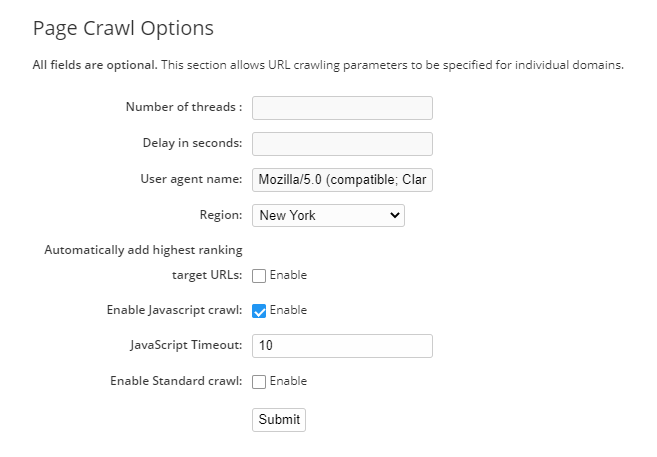
Number of threads: To set a threshold for number of concurrent threads that crawl at once
Delay in seconds: The number of seconds the crawler should wait when crawling each page
User agent name: Specify a user agent name for the daily managed page crawl and Content Fusion crawl. If this is not set. The default HTTP User Agent is "Mozilla/5.0 (X11; Linux x86_64) AppleWebKit/537.36 (KHTML, like Gecko) Chrome/63.0.3239.132 Safari/537.36 (compatible; linkCheckV3.0)". Common Google User Agents are:
Google Desktop - Mozilla/5.0 (compatible; Googlebot/2.1; +http://www.google.com/bot.html)
Google Mobile - Mozilla/5.0 (iPhone; CPU iPhone OS 8_3 like Mac OS X) AppleWebKit/600.1.4 (KHTML, like Gecko) Version/8.0 Mobile/12F70 Safari/600.1.4 (compatible; Googlebot/2.1; +http://www.google.com/bot.html)
Region: Select a region to utilize IPs closest to your hosting provider. These regions have
specific IPs available.
Automatically add highest ranking target URLs: Enable this checkbox option to add highest ranking URLs to Page Clarity.
Associate keyword with ranking page: Automatically add highest ranking target URLs must be enabled. Enable this checkbox option to Associate keyword with the ranking page.
Enable JavaScript crawl: Enable this checkbox option to use the JavaScript crawler for managed pages in Page Clarity.
Enable Standard crawl: Enable this checkbox option to use the standard (non-JS) crawler for managed pages in Page Clarity.
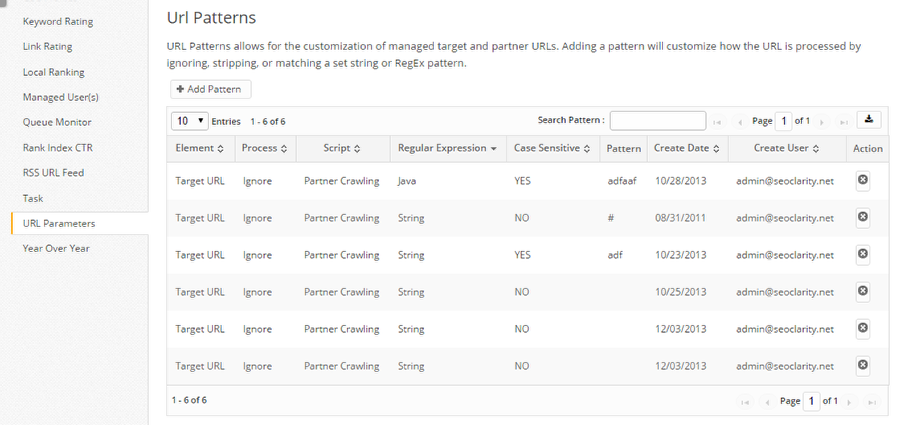
URL Patterns allows for the customization of managed target pages (Page Clarity) and partner URLs (aka backlinks in Link Clarity). Adding a pattern will customize how that type (Target or Partner) of URL is processed by ignoring, stripping, or pattern matching. This is helpful for analytics feeds or backlinks that include many tracking parameters.
Please note that URL patterns setting do not apply to site analytics.
Adding a New URL Pattern
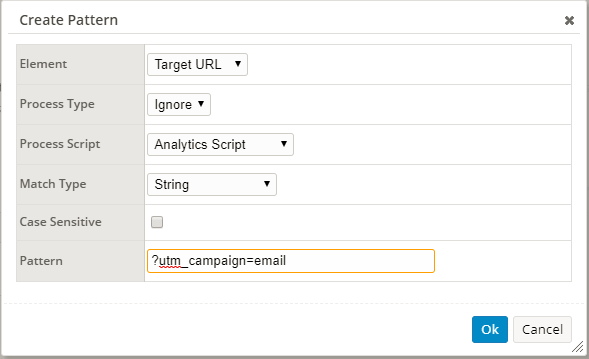
Element: Target URL (managed URLs in Page Clarity) or Partner URL (managed URLs in Link Clarity)
Process Type: Ignore, Strip or Match
Process Script: The specific section of the platform that the pattern will effect. Partner Crawling (Link Clarity), Clarity Audit, Analytics Script, PPC Script, Back Links, Pattern Match.
Match Type: String or Javascript Regex
Case Sensitive: Checked for yes, unchecked for no.
Pattern: URL Input
Page Clarity URL Structure
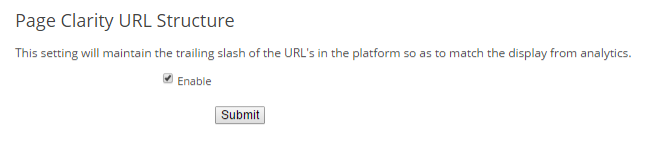
This setting will maintain the trailing slash of the URL's in Page Clarity so that analytics are properly attributed. Compare your analytics URLs within the Analytics Page Report to compare them with how they were added in Page Clarity to determine if this is needed. Oftentimes it is not needed.
Related Platform Sections
Page Clarity
Link Clarity
Analytics
Usability