How to Download ArcAI Search Visibility or Sentiment Data
Q: How can I download ArcAI Search Visibility or Sentiment data from the platform?
You can easily download your data by following these steps:
1. Locate the Download Icon:
Find the download icon at the top right corner of the table, just below the chart.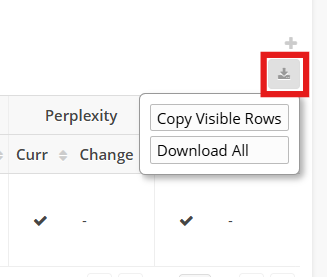
2. Choose Your Download Option:
Copy Visible Rows: This option allows you to copy and paste the rows and columns currently visible on your screen.
Download All: This option lets you download all data based on the filters available (e.g., date range, search engine, location, brand, topic).

If you have any questions or need further help, feel free to reach out to us at support@seoclarity.net. We’re here to assist you!