How do I copy a dashboard from one account to another?

How do I copy a dashboard from one account to another?

How To Copy A Dashboard Video


How To Copy A Dashboard Steps
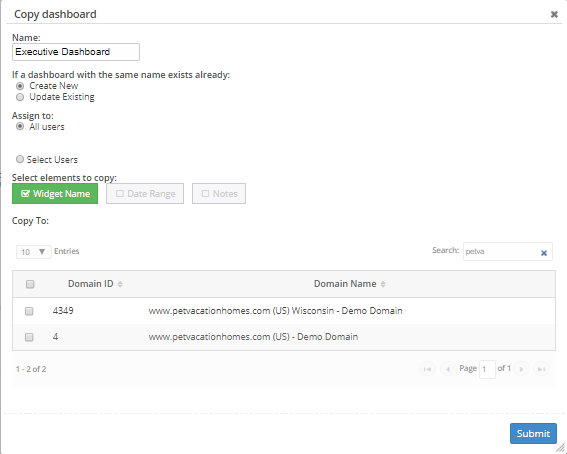
The easiest way to replicate a dashboard in another domain is first navigate to the dashboard you wish to copy, and select the copy dashboard button. 


Once selected, a Copy dashboard pop-up will appear where you can choose to rename this dashboard, as well as select the domains which you can copy this dashboard to.  Fill out this information and select Submit.

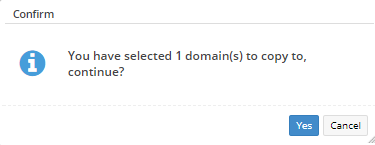
After selecting submit, a new pop-up will appear.  Select Yes.

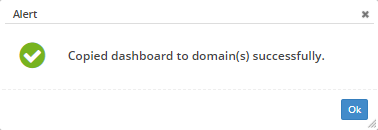
You will now receive an alert letting you know that the dashboard has been copied successfully.

    • Related Articles

    • Dashboard Reports: How to Create, Edit, Copy, and Email

      Dashboard Overview This walkthrough will lead you through everything about the new Dashboard. It takes you from the absolute first steps of creating a new dashboard to editing the dashboard and deleting the dashboard. This entire walkthrough will ...
    • Multi-Domain Dashboard

      Multi-Domain Dashboard Overview seoClarity's Multi-Domain dashboard option provides reporting for multiple domains in one single dashboard. The Multi-Domain dashboard aggregates the data for multiple domains whether they are desktop domains, mobile ...
    • Dashboard Widgets & Descriptions

      Dashboard Widgets Overview Below is a list of the Dashboard widgets including: the type of data they use, what they visually appear as, if they include a data table, a description, and the platform section the data can be seen in. Some widgets are ...
    • Dashboard settings

      Dashboard Settings Overview Custom Dashboards can be created, edited, deleted, and assigned in this settings section. Insight to all SEO data is available through Dashboards, which can be used to tell a story in the form of a report. Default ...
    • How can a Dashboard report be exported as a PDF?

      All dashboards setup to be emailed come with the report attached as a PDF. This means you can email the dashboard to retrieve a PDF version or download without using the Email dashboard option, by selecting the Print Preview option above the report. ...