Dashboard Reports: How to Create, Edit, Copy, and Email

Dashboard Reports: How to Create, Edit, Copy, and Email

Dashboard Overview

This walkthrough will lead you through everything about the new Dashboard. It takes you from the absolute first steps of creating a new dashboard to editing the dashboard and deleting the dashboard. This entire walkthrough will give you all the ins-and-outs of the new layout and and new features of the dashboard.

seoClarity Dashboards are real-time interactive, which means a user can modify the parameters for the data displayed by a Dashboard widget and see the results update in real time, just as they can in the platform feature the widget represents. This video shows how that works:


Dashboard Use Cases

  1. Translate SEO into an engaging story using dashboards. Learn more
  2. Create an SEO dashboard for executives. Learn more
  3. Highlight your wins using custom dashboards.  Learn more

Background & Requirements

To start the Dashboard walk through, you will first need to be logged into the seoClarity app and have selected the managed domain that you would like to working on the dashboards.
       

How To Create A New Dashboard           

1. Click on the + button on the dashboards page to get started


2. In the Create Dashboard pop-up, type in a custom name for the dashboard

3. Click Create


4. In the Save Selection dropdown menu, choose between All Selections Except Date (Default), All Selections, and None. The default selection will save all selected metrics not including the date range. The all selections option will save all metrics including the date range and the none option will not save any of the specific metrics.

5. Next use the Who Can View dropdown menu to set user permissions. Setting as User Default enables the specific user to see the dashboard you are creating by default upon logging in, whereas Setting as Domain Default enables all users with access to the domain to see the dashboard upon logging in. Adding users to Domain simply adds the dashboard you are creating to the list of available dashboards for that domain.  Selecting specific users to grant access to allows you to specify certain users that can view this particular dashboard.

6. Click the Set as Domain Default check box if you want all users to have this dashboard appear when they log into the app

7. Use the select widget(s) menu

8. Click Save Dashboard


How To Edit A Dashboard            

1. To edit a custom dashboard, click on the pencil icon for specific Dashboard. For changes to take affect, they need to be saved. For date ranges to be saved, the save type for 'All selections' should be used.


Renaming the Dashboard            

2. Delete the current dashboard name in the text box

3. Type in new dashboard name


Edit Dashboard User Access

4. If your dashboard is not set as default and you would like it to be the dashboard that appears when you log in, select Set as Default Dashboard for Self

5. If you want selected users to see the dashboard as the default dashboard, select Set as Default Dashboard for Selected Users. Do not select any option if you would like to keep your Default Dashboard or a previously selected dashboard as your default dashboard.

6. In the Unselected column, click the user that you would like to add to the Selected column. To select multiple users, hold down the Ctrl on your keyboard while you click the names.

7. Click on the >> button to add the selected users


8. To remove users, highlight the users that you want to remove in the Selected column

9. Click the transfer << button


Adding Widgets to the Dashboard

1. Use the select widget(s) menu to find the widgets that you would like to add to the dashboard

2a. Hover over a widget and click the Add button. 


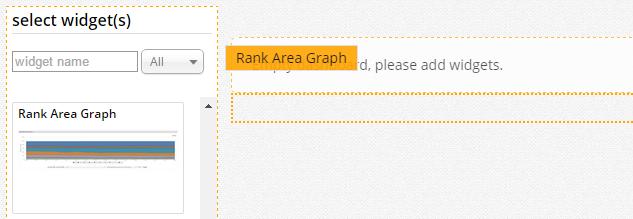
2b. Another way of adding widgets to your dashboard is to drag and drop them in any location on the dashboard. This is what will appear if you drag and drop the widget from the select widget(s) menu to the dashboard. 


Renaming the Widgets            

3. Next to the widget name, click on the pencil icon

4. In the text box, delete the current widget name

5. Type in your custom widget name in the text box


Changing the Date             

6. On the right side of the widget, click on the date range

7. In the pop-up, choose which view you would like to change - Day, Week, Month

8. Click the calendar icon on the left to select the start date

9. Click on the calendar icon on the right to select the end date 

Steps 7 - 9 are all Custom date ranges. There are options to select preset date ranges. You can select Last 2 Days, Last 7 Days, and Last 30 Days.

10. Click Apply


Create/Edit a Note            

11. Click on the talk comment bubble icon                  


12. Use the Title text box to enter in a title for the note

13. Use the large, Description text box to describe the note in detail     


Edit the Size of the Widget            

14. To change the size of the widget click on the button

15. In the dropdown select the width of the widget of your choice: Full, 2/3, Half, 1/3

Click anywhere outside of the dropdown menu to close the menu.  


Removing a Widget            

16. To delete the dashboard widget click on the X


How To Copy A Dashboard            

1. To copy a dashboard to another domain, click on the Copy icon                    


2. If you would like, you can rename the dashboard or keep it the same in the Name text box

3. If the domain you are copying this dashboard to has a dashboard by that name, you have the option to Create New or Update Existing . Selecting Create New will copy over the existing dashboard and selecting Update Existing will overwrite a dashboard with the same name.

4. Click on any elements of the elements, Widget Name, Date Range, or Notes, to include in the copied dashboard

5. Use the check boxes to select which domain you would like to copy the dashboard to

6. Click Submit


How To Delete a Dashboard            

1. Use the dropdown menu to choose the dashboard that you would like to delete

2. Click on the Edit button (the pencil icon)

3. Click the Delete button (the trash can icon)


4. In the pop-up that appears, click Ok to delete the dashboard                       


How To Email Dashboard Reports     

Dashboards can be sent out via email or sFTP one time or on a recurring basis.

1. Select the Email dashboard icon to view the dashboard delivery settings.
2. Choose the delivery type, Email or sFTP. 
3a. If email, choose the email addresses that should receive the dashboard report. 
3b. If sFTP, choose the sFTP location. sFTP locations can be added via sFTP Settings for selection here.
4. Enter in the subject title.
5. Select the frequency, either once or recurring.
6. Enter in the file name
7. Select save.


To edit a currently scheduled dashboard report, navigate to the Settings page and locate the dashboards tab.


Universal Options for Dashboards

An easy way to update all your widgets using the same values when needed is using the Universal Options button located on your right hand.


1. Make sure you are in the edition mode by clicking on the pencil icon to assure your changes will be applied.
2. Click on the Universal Options button


3.- Modify the date range or any other filter like Keywords or Page Tags.


4.- Click on update and don't forget to save the dashboard.

This will save you time and update ALL the widgets on that dashboard, making this task easier than going one widget at the time.


    • Related Articles

    • Multi-Domain Dashboard

      Multi-Domain Dashboard Overview seoClarity's Multi-Domain dashboard option provides reporting for multiple domains in one single dashboard. The Multi-Domain dashboard aggregates the data for multiple domains whether they are desktop domains, mobile ...
    • What Dashboards Should I Create?

      To create a story-driven SEO report, begin with four simple questions: Where are we now? How did we get here? Where do we want to be? How do we get there? Every one of these questions can be answered in a single dashboard for any audience you have. ...
    • Tasks: How to Create, Assign, Manage, and Customize Tasks

      Task Management Overview Create tasks in your seoClarity account allows you to assign tasks out to yourself and other users to help create an efficient workflow and operationalize your SEO efforts. Custom task statuses and templates can be added with ...
    • Dashboards Overview (Video)

      Dashboards Overview Video &lt;br&gt; More information on Dashboard Reports
    • How can a Dashboard report be exported as a PDF?

      All dashboards setup to be emailed come with the report attached as a PDF. This means you can email the dashboard to retrieve a PDF version or download without using the Email dashboard option, by selecting the Print Preview option above the report. ...