Overview
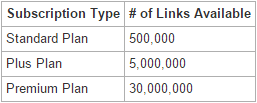
The Ahrefs integration allows for Ahrefs data to be pulled into Research Grid's Backlinks in a streamlined fashion via the Ahrefs API. Once setup, the data is retrieved in bulk based on the API Subscription level (see table below for link availability).
Background & Requirements
First, you will need to have to browser windows open up to the Ahrefs website and seoClarity Settings page. This integration also requires an Ahrefs API subscription plan, which is a separate add-on from their regular membership.
Ahrefs Subscriptions
Ahrefs API Token
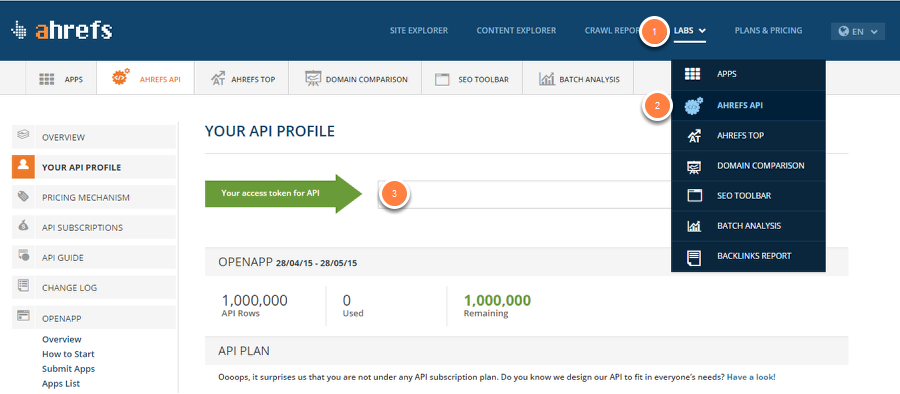
1. Click on the LABS option in the top navigation bar
2. In that drop down, click on AHREFS API option
3. From here we'll be able to retrieve the API Token
If a subscription plan has not been setup a message will display stating so, and the integration cannot be completed without it.
Ahrefs Setup
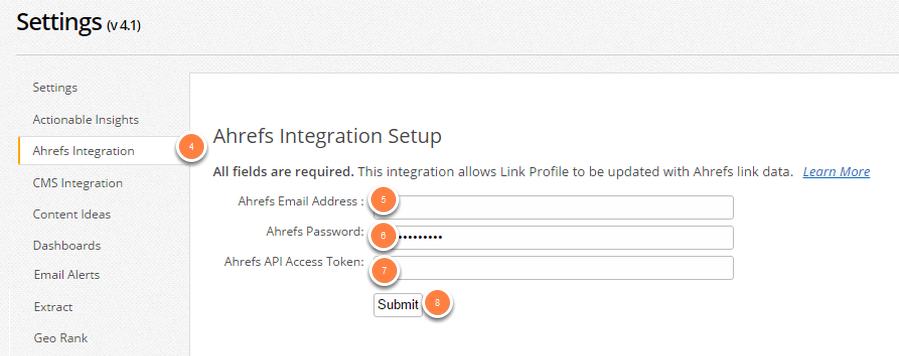
4. On the seoClarity Settings page, click on AHREFS INTEGRATION in the left navigation bar
5. Enter in your AHREFS Email Address into the first text box
6. Then enter in your AHREFS account password into the next text box
7. Take the API Token that was generated by AHREFS and enter that into the third text box
8. Click Submit
Summary
This integration has been streamlined so it is even easier to bring your backlink data from your Ahrefs account. After going through this walk-through, your Ahrefs data will appear in Research Grid's Backlinks section of that seoClarity platform. The data that is brought into Backlinks will be automatically de-duplicated from the Majestic link data seen in Backlinks so that you have the clearest view of your Backlinks.